We all want our programs to be the fastest (except the frontenders, they don't care), so we need to know what the CPU cache is. I learned most of what I know about it from Scott Meyers talk CPU Caches and Why You Care, so this post is mostly short recall of it. I will also added some JavaScript tests to prove some points during the tall.
A tale of two traversals 
Let's start with the example that opens the talk. Here are two almost identical ways to walk through a matrix:
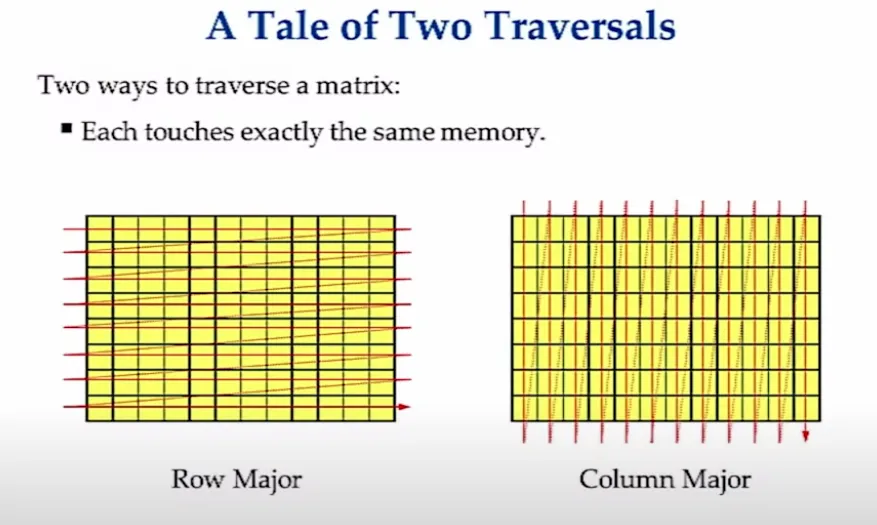
- Row major goes through each row horizontally.
- Column major goes through each column vertically.
Code implementation
void sumMatrix(const Matrix<int>& m,
               long long& sum, TraversalOrder order)
{
  sum = 0;

  if (order == RowMajor) {
    for (unsigned r = 0; r < m.rows(); ++r) {
      for (unsigned c = 0; c < m.columns(); ++c) {
        sum += m[r][c];
      }
    }
  } else {
    for (unsigned c = 0; c < m.columns(); ++c) {
      for (unsigned r = 0; r < m.rows(); ++r) {
        sum += m[r][c];
      }
    }
  }
}
So they should have the same performance? Right?
WRONG!
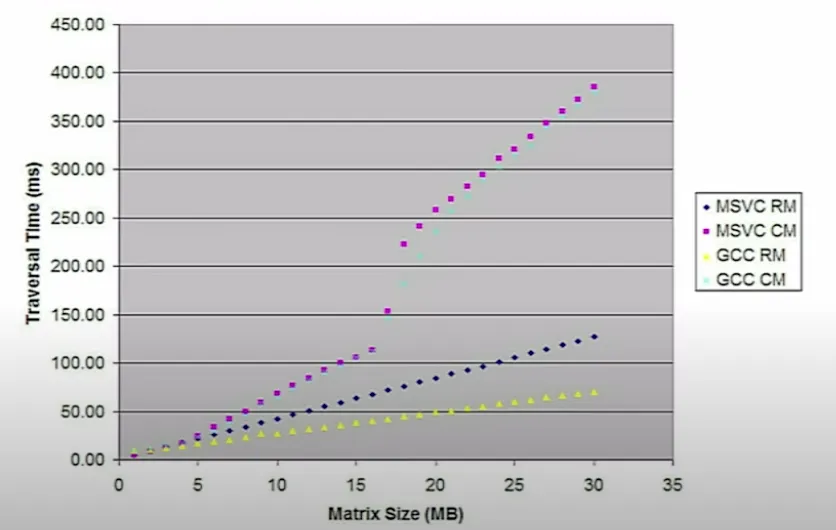
The higher, the worse.
For some reason column major takes way longer than row major. And no, this is not the compiler's fault. Keep a guess in mind for why, because we'll come back to it once we know how the cache works.
A scalability story (or why more threads != more performance)
The talk's second example is about threads. It's based on the article Eliminate False Sharing.
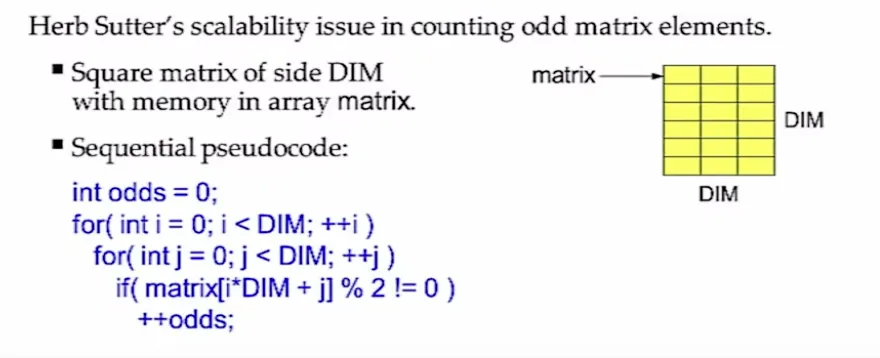
We have some code that counts all the odd elements in a matrix. Let's say our CPU isn't very powerful, but it has a lot of threads (24 to be precise), and we're only using one of them. Free performance, right??? 
int result[P];

// Each of P parallel workers processes 1/P-th of the data;
// the p-th worker records its partial count in result[p]
for (int p = 0; p < P; ++p )
  pool.run( [&,p] {
    result[p] = 0;
    int chunkSize = DIM/P + 1;
    int myStart = p * chunkSize;
    int myEnd = min( myStart+chunkSize, DIM );
    for( int i = myStart; i < myEnd; ++i )
      for( int j = 0; j < DIM; ++j )
        if( matrix[i*DIM + j] % 2 != 0 )
          ++result[p]; } );

pool.join();                 // Wait for all tasks to complete

odds = 0;                    // combine the results
for( int p = 0; p < P; ++p )
  odds += result[p];
So we split the matrix into chunks, run the same code on every chunk in parallel, and for each odd number we increase result[p], where p is the thread's own slot in a shared array.
Now let's see the results for different numbers of threads:
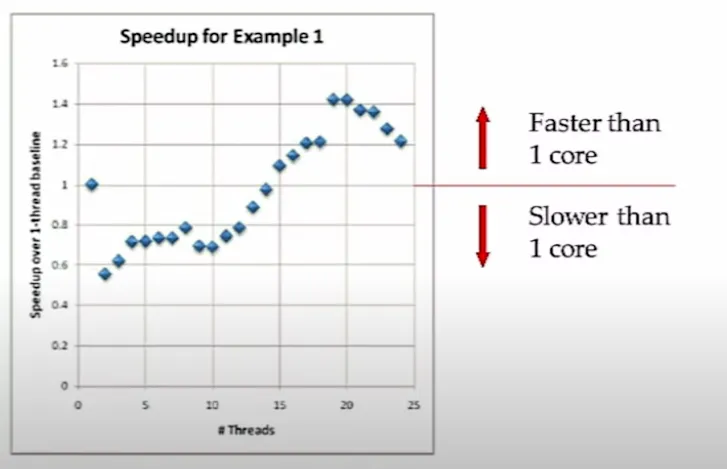
Huh, well that's interesting. Until about 15 threads, the parallel version is actually slower than a single thread. And after 20 threads, the performance goes down again.
So, in true peak 21st-century engineering fashion, let's do a proper investigation and ask our good friend grok  what the reason could be:
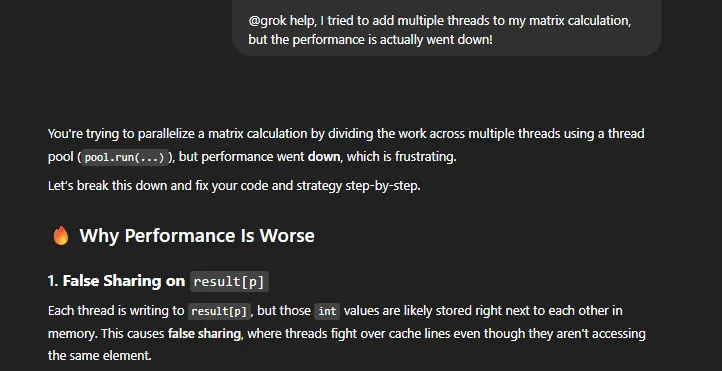
So... what is this "False sharing" thingy?
False sharing
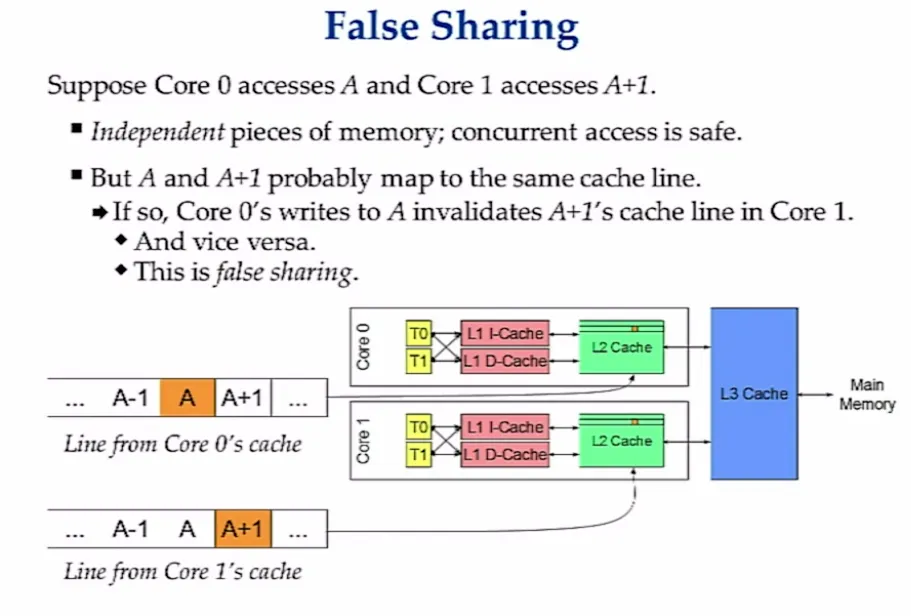
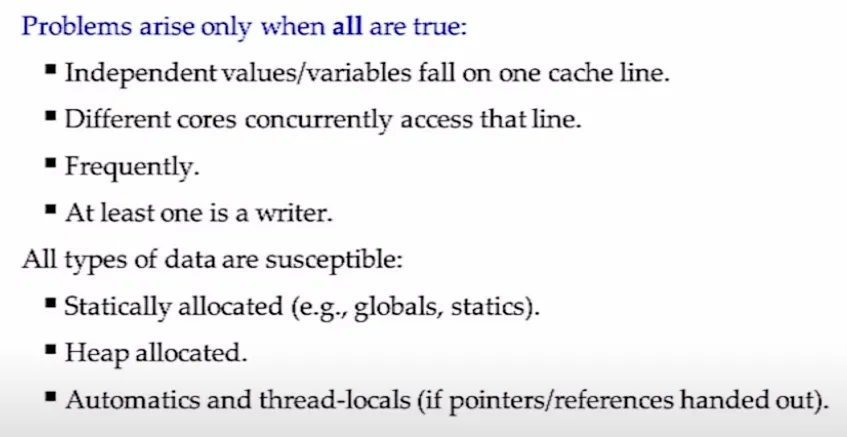
The threads don't share any data. Each one only writes to its own result[p]. But all those slots sit right next to each other in memory, so they land in the same block of the cache. When one thread writes to its slot, the CPU marks that whole block as invalid for every other thread, and they all have to reload it.
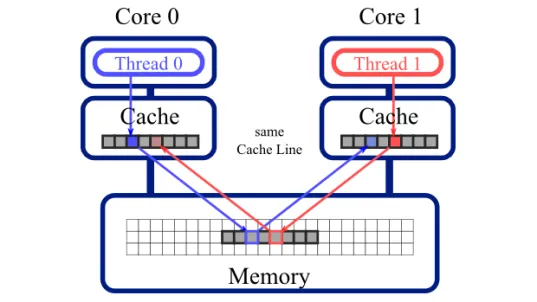
So the threads "fight" over a piece of memory they don't even really share.
You can see this on the CPU monitor too:
Running with P = 1 (one thread, our baseline)
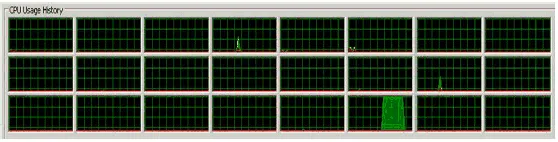
Running with P = 14 (about the same time as P = 1, ugh)
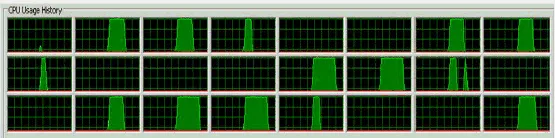
More threads are busy, but the whole run takes the same time as with one thread. They spend most of it idling, waiting on memory. A profiler confirms it: the slowest line in the whole program is ++result[p], because of cache misses.
Each thread counts into its own local variable and writes to result[p] only once, at the very end:
int result[P];

for (int p = 0; p < P; ++p )
  pool.run( [&,p] {
    int count = 0;                        // instead of result[p]
    int chunkSize = DIM/P + 1;
    int myStart = p * chunkSize;
    int myEnd = min( myStart+chunkSize, DIM );
    for( int i = myStart; i < myEnd; ++i )
      for( int j = 0; j < DIM; ++j )
        if( matrix[i*DIM + j] % 2 != 0 )
          ++count;                        // instead of result[p]
    result[p] = count; } );               // new statement

...                                       // nothing else changes
And the results:
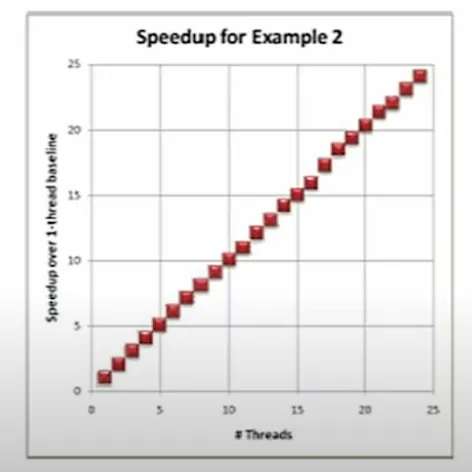
surprised pikachu face
The CPU monitor shows the threads really stopped idling:
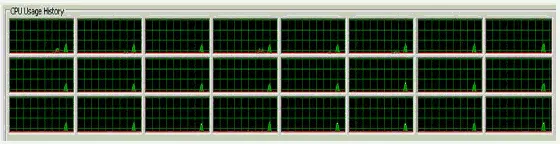
How to identify and fix false sharing
False sharing isn't the main subject of the talk, so if you want to go deeper, read Eliminate False Sharing.
In the CPU cache we go
So what even is the CPU cache, and how fast is it compared to normal memory?
Cache hierarchies (multi-level caches)
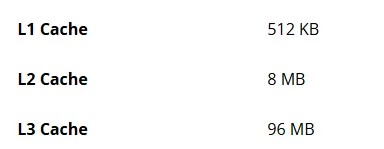
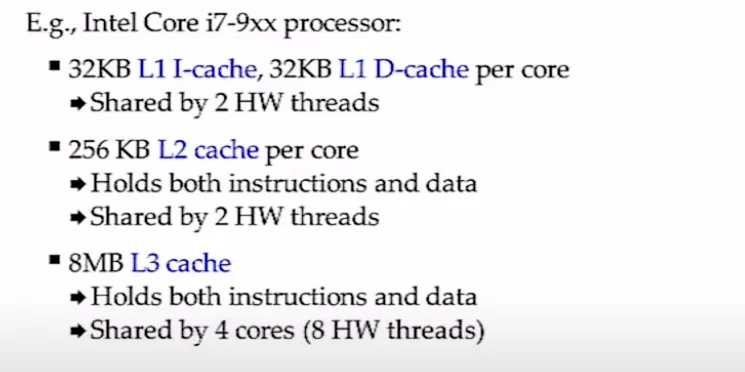 The numbers vary between processors. But even 11 years after the talk, cache sizes are still tiny. For example, here's the AMD Ryzen 7 7800X3D:
Cache performance
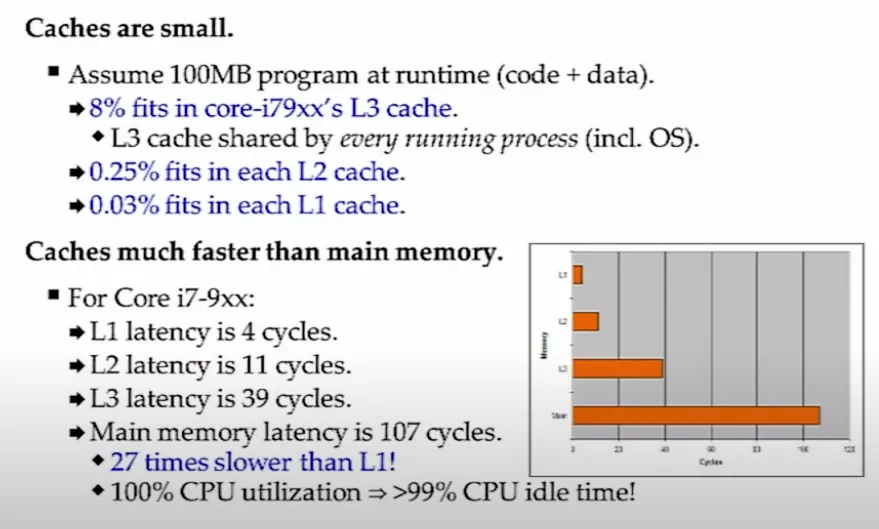
So we're stuck with very small cache sizes, but in return we get unreasonably fast memory. If you remember one thing from this post, let it be this:
Small == fast
- There's no time/space trade-off at the hardware level.
- Compact, well-localised code that fits in the cache is the fastest.
- Compact data structures that fit in the cache are the fastest.
- Traversals that only touch cached data are the fastest.
Cache lines
Okay, back to our two matrix traversals. To answer why one is faster, we need to know how the cache is structured:
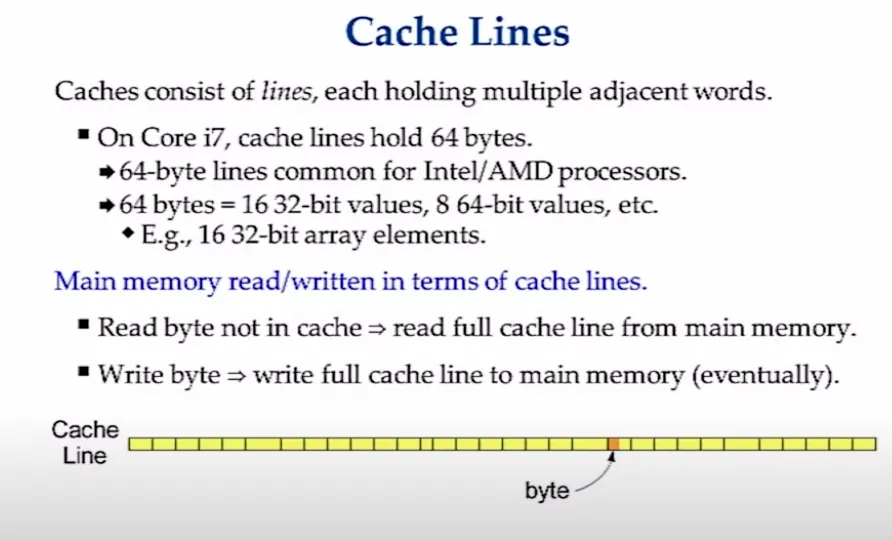
The CPU doesn't load single bytes into the cache. It loads 64 bytes at a time (32 on older machines), and each of these chunks is called a cache line.
Now look at how column major uses them:
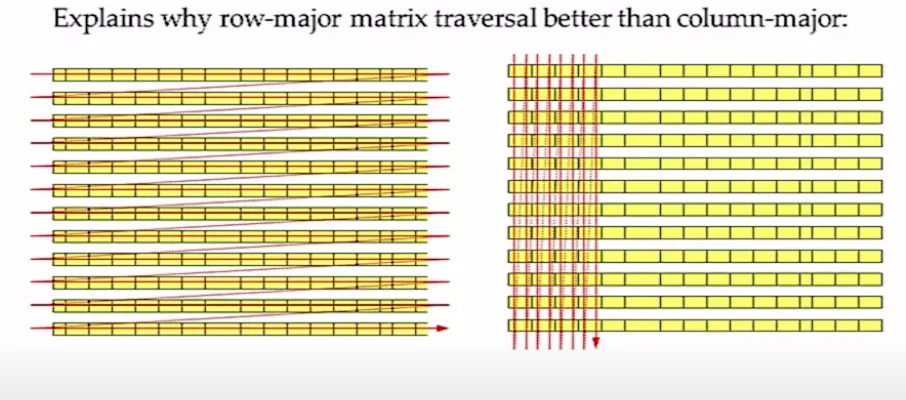
Every step down a column needs a different cache line. We load a whole line, use 4 bytes of it, then throw it away for the next one. Infinite cache miss hell 
Row major does the opposite. It uses the entire cache line before moving on, because the next element is always right there. That's the whole difference between the two traversals.
The CPU tries to predict you
The CPU also prefetches. When it sees you walking through memory in a pattern, it loads the next cache lines before you even ask for them:
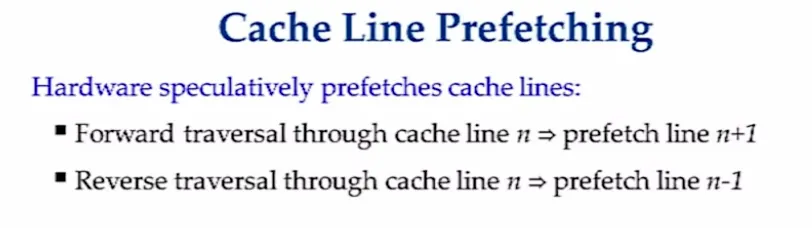
This is why it's really important to write "predictable" code. You'll benefit much more from going through every object in the array in order than from jumping around the array randomly and marking the ones you've already seen (even if the object you need is the last one in the array).
Test case to prove my words
Two files, sequential.ts and shuffled.ts, which are identical except for one line. Both read the same 64 MB array, one in a row and the other in random order. I ran both with hyperfine and bun, on an AMD Ryzen 7 9800X3D with Windows 11:
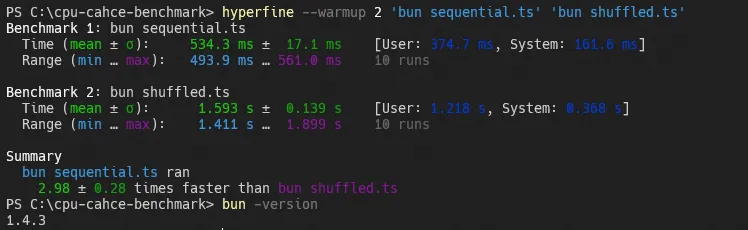
As you can see, the shuffled example was 3 times slower.
const N = 16_000_000; // 64 MB of int32, way bigger than any CPU cache
const data = new Int32Array(N);
const sequential = new Int32Array(N);
for (let i = 0; i < N; i++) data[i] = sequential[i] = i;

// The same indices, shuffled
const shuffled = sequential.slice();
for (let i = N - 1; i > 0; i--) {
  const j = Math.floor(Math.random() * (i + 1));
  const tmp = shuffled[i];
  shuffled[i] = shuffled[j];
  shuffled[j] = tmp;
}

function sum(order: Int32Array) {
  let total = 0;
  for (let k = 0; k < N; k++) total += data[order[k]];
  return total;
}

// The only line that differs between the two files
const order = sequential; // shuffled.ts: const order = shuffled;
let total = 0;
for (let pass = 0; pass < 30; pass++) total += sum(order);
console.log(total);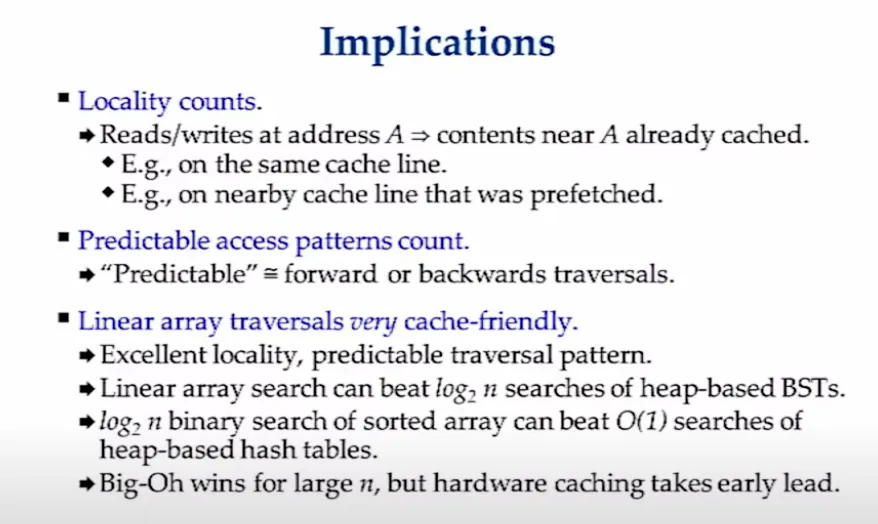
The slide above says that $O(\log_{2} n)$ can beat $O(1)$, which sounds wrong at first. But it depends on $n$. When the data is small enough to fit in the cache, the "slower" algorithm can win because it plays nicely with the cache. With very large $n$, big-O wins again.
Cache coherency
I touched on this with false sharing, but let's look at how multiple cores keep their caches in sync.
If we had to keep every cache level (L1, L2, L3) consistent across cores ourselves, we would go insane. Luckily, hardware manufacturers do it for us 
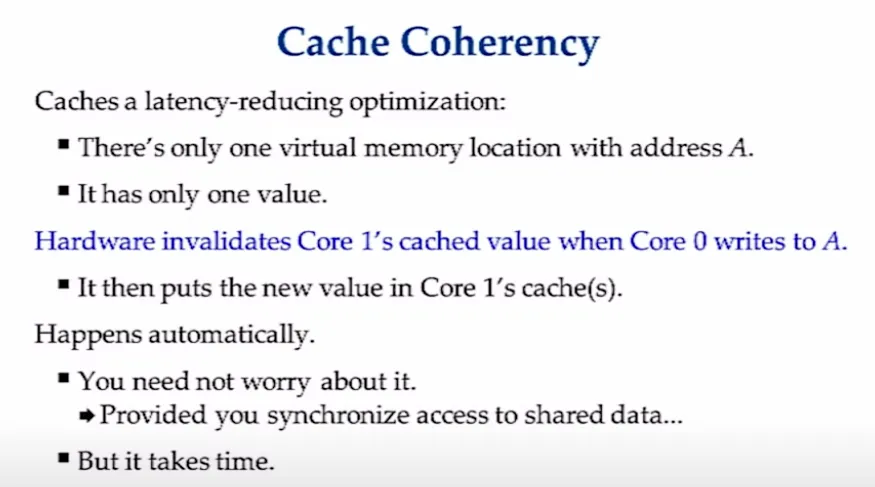
It works a bit like a database with replicas. Every core has its own copies of cache lines, but they all point to one source of truth in memory. The only catch is that a write marks that cache line as invalid for every other core. And that's exactly how we got false sharing earlier. So let's go further into optimising for the cache, shall we?
So how do we optimise for the cache?
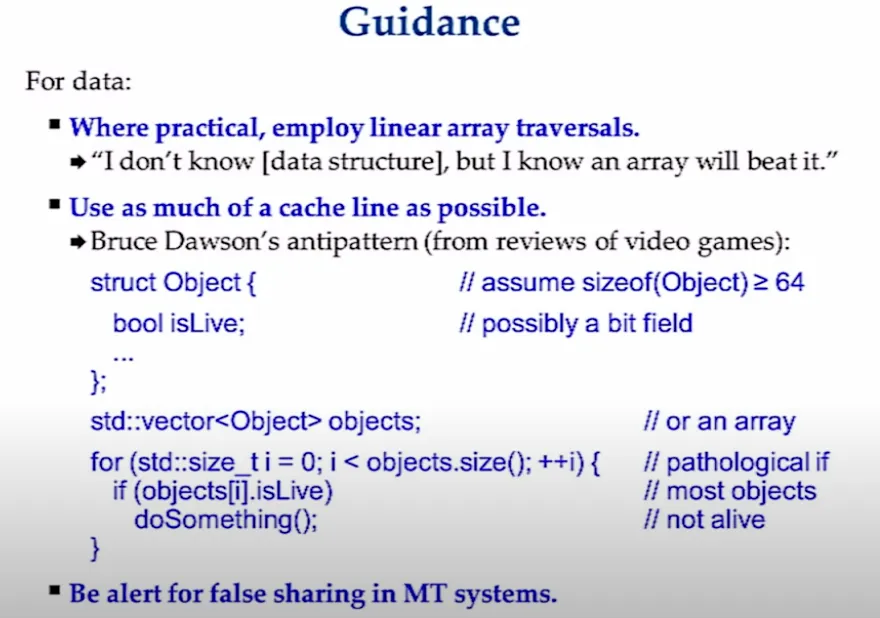
- In most cases, a simple linear array is the best friend of your CPU. Not always, but often enough to be the first thing you reach for.
- Data-oriented design, from Mike Acton's talk on Data-Oriented Design. Instead of one big object holding all its data, keep each kind of data in its own array. If a loop only needs one boolean from every object, it shouldn't load the whole object into a cache line just to read one bit of it.
- Watch out for false sharing in multi-threaded code.
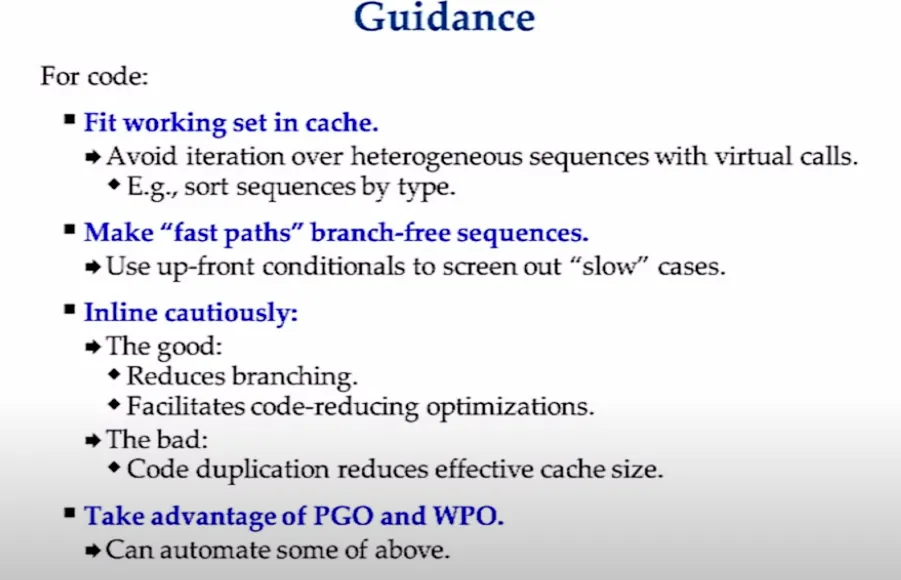
The CPU also caches instructions, not only data, so your code layout matters too. To be honest, I didn't fully get these points at first, so I asked ChatGPT for examples. Take "make fast paths branch-free": handle the rare case once, up front, instead of checking it on every iteration:
// Bad: the hot loop checks a condition every time
for (int i = 0; i < N; ++i) {
    if (x == 0) {
        data[i] = handleZeroCase(data[i]);
    } else {
        data[i] = doSomethingFast(data[i]);
    }
}

// Good: decide once, then run a loop with no branches
if (x == 0) {
    handleZeroCase();
} else {
    for (int i = 0; i < N; ++i) {
        data[i] = doSomethingFast(data[i]);
    }
}
The other two are simpler. Keep your working set in the cache, for example by grouping objects by type and processing each type in one pass instead of calling virtual functions on a mixed list. And inline carefully: inlining a tiny function in a hot loop helps, but inlining a big one everywhere bloats the code and pushes other instructions out of the cache.
TLDR 
Two things to remember from all of this:
- small == fast.
- The less memory your code and data take, the more of it fits in the cache, and the cache is where all the speed is.
- don't do premature optimisation
- This one is from me, not from the original talk. Most of the tricks here only pay off in the hot parts of your program. So don't rewrite your whole project into arrays of booleans just in case
 . Find the slow part first, then come back to this post.
- This one is from me, not from the original talk. Most of the tricks here only pay off in the hot parts of your program. So don't rewrite your whole project into arrays of booleans just in case
Most of the time you won't need any of this. But next time your code is slow for no obvious reason, check how it walks through memory before you blame the compiler or start throwing threads at it.